 JarCasting
zhCaptcha


1.简介
Java验证码,支持字母+数字混合、纯数字、纯字母、纯中文、算术等类型,可自定义验证码文本,支持JPEG、PNG、GIF等图片格式,可用于Java Web、JavaSE等项目。
2.效果展示
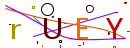
字母+数字混合类型:

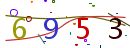
纯数字类型:
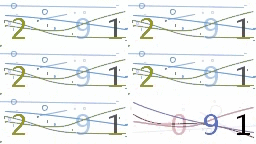
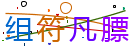
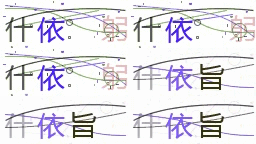
中文类型:
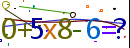
算术类型:

3.导入项目
3.1.Apache Maven
<dependencies>
   <dependency>
     <groupId>com.github.zh9131101</groupId>
     <artifactId>zh-captcha</artifactId>
     <version>Latest Version</version>
   </dependency>
</dependencies>
3.2.jar包引入
maven导入jar包,在项目根目录创建libs文件夹,然后pom.xml添加如下:
<dependency>
  <groupId>com.github.zh9131101</groupId>
       <artifactId>zh-captcha</artifactId>
       <version>x.x.x</version>
  <systemPath>${basedir}/libs/zh-captcha-x.x.x.jar</systemPath>
</dependency>
4.使用方法
4.1.在SpringMVC中使用
@Controller
@RequestMapping("captcha")
public class CaptchaController {
    /* ------>>> 简单使用 <<<------*/

    /**
     * Png格式的快速使用
     * 类型:字母数字组合验证码
     *
     * @param request HttpServletRequest
     * @param response HttpServletResponse
     * @throws IOException IOException
     */
    @GetMapping("defaultPng")
    public void defaultPng(HttpServletRequest request, HttpServletResponse response) throws IOException {
        CaptchaUtils.rendererPng(request, response);
    }

    /**
     * Gif格式的快速使用
     * 类型:字母数字组合验证码
     *
     * @param request HttpServletRequest
     * @param response HttpServletResponse
     * @throws IOException IOException
     */
    @GetMapping("defaultGif")
    public void defaultGif(HttpServletRequest request, HttpServletResponse response) throws IOException {
        CaptchaUtils.rendererGif(request, response);
    }

    /* ------>>> 自定义类型使用 <<<------*/
    /**
     * 验证码
     *
     * @param request HttpServletRequest
     * @param response HttpServletResponse
     * @throws IOException IOException
     */
    @GetMapping
    public void numArabicPng(HttpServletRequest request, HttpServletResponse response) throws IOException {
        // 使用验证码工厂创建验证码
        AbstractCaptcha captcha = TextImageCaptchaFactory.getInstance().createCaptcha();
        // AbstractCaptcha captcha = ArithmeticCaptchaFactory.getInstance().createCaptcha();
        /*
         * 自定义char[]验证码内容随机文本:
         * 1、CaptchaConst.NUM_ARABIC:阿拉伯数字
         * 2、CaptchaConst.EN_MIX:大小写字母混合
         * 3、CaptchaConst.NUM_EN_MIX:通用的数字和英文字符,去掉容易混淆的0,o,1,i,l
         * 4、CaptchaConst.NUM_EM_ALL:大小写字母 + 数字混合
         * 5、CaptchaConst.CHINESE:常用中文
         */
        captcha.setRandomText(CaptchaConst.NUM_EN_MIX);
        // 生成验证码(注:需在缓存与渲染验证码之前调用)
        String captchaCode = captcha.generateCaptcha();
        // 将验证码缓存,这里使用内置的session方式缓存(注:使用session方式缓存需在渲染验证码前,因为渲染方法内关闭了流,导致缓存错误)
        CaptchaUtils.sesseionCache(captchaCode, request);
        // 渲染验证码,rendererPngCaptcha渲染PNG格式,rendererGifCaptcha渲染GIF格式,RendererUtils.renderer自定义图片格式渲染
        CaptchaUtils.rendererPngCaptcha(captcha, response);
        // CaptchaUtils.rendererGifCaptcha(captcha, response);
        // RendererUtils.renderer(CaptchaConst.PNG, response.getOutputStream(), captcha); //Param1:图片后缀名
    }
}
4.2.验证码校验
@Controller
public class LoginController {
    @Autowired
    private IUserService userService;

    /**
     * 用户登录
     *
     * @param request HttpServletRequest
     * @param username 账号
     * @param password 密码
     * @param code 验证码
     * @return ReplyUtils
     */
    @PostMapping("/login")
    @ResponseBody
    public ReplyUtils login(@RequestParam("username") String username,
                            @RequestParam("password") String password,
                            @RequestParam("code") String code,
                            HttpServletRequest request) {
        boolean verify = CaptchaUtils.sessionVerify(code, request);
        // 登录操作……
        if (verify && userService.login(username, password)) {
            return ReplyUtils.success("登录成功");
        }
        return ReplyUtils.fail("登录失败");
    }
}
4.3.自定义验证码属性
AbstractCaptcha的相关值
| 类型 | 描述 |
|---|---|
| font | 验证码的字体:默认宋体 |
| bgColor | 验证码的背景色:默认白色 |
| length | 验证码随机字符长度:默认4 |
| width | 验证码显示宽度:默认130 |
| height | 验证码显示高度:默认48 |
| randomText | 随机文本内容:默认字母+数字混合 |
| fontPath | 字体路径:默认/font/ |
| fontName | 字体名:默认microsoft_yahei.ttf(微软雅黑) |
| fontStyle | 字体样式:默认Font.PLAIN(值0) |
| fontSize | 字体大小:默认32 |
| obstructLineCount | 干扰直线数量:默认2 |
| obstructOvalCount | 干扰圆数量:默认2 |
| obstructPointCount | 干扰点数量:默认20 |
| bezierCurvesCount | 干扰线(贝塞尔曲线)数量:默认2 |
AbstractCaptcha注入到Spring IOC容器
@Component
public class CaptchaConfig {

    @Bean("textImageCaptcha")
    public AbstractCaptcha textImageCaptcha() {
        return TextImageCaptchaFactory.getInstance().createCaptcha();
    }

    @Bean("arithmeticCaptcha")
    public AbstractCaptcha arithmeticCaptcha() {
        return ArithmeticCaptchaFactory.getInstance().createCaptcha();
    }
}
控制类
@Controller
@RequestMapping("captcha")
public class CaptchaController {
    /**
     * 注入普通验证码
     */
    private final AbstractCaptcha textImageCaptcha;

    /**
     * 注入算术验证码
     */
    private final AbstractCaptcha arithmeticCaptcha;

    @Autowired
    public CaptchaController(@Qualifier("arithmeticCaptcha") AbstractCaptcha arithmeticCaptcha, @Qualifier("textImageCaptcha") AbstractCaptcha textImageCaptcha) {
        this.arithmeticCaptcha = arithmeticCaptcha;
        this.textImageCaptcha = textImageCaptcha;
    }

    /**
     * 普通验证码
     *
     * @param request HttpServletRequest
     * @param response HttpServletResponse
     * @throws IOException IOException
     */
    @GetMapping
    public void textImageCaptcha(HttpServletRequest request, HttpServletResponse response) throws IOException {
        // 设置验证码随机文本
        textImageCaptcha.setRandomText(CaptchaConst.NUM_EN_MIX);
        // 设置验证码长度
        textImageCaptcha.setLength(5);
        // 设置干扰直线数量
        textImageCaptcha.setObstructLineCount(4);
        // 设置干扰圆数量
        textImageCaptcha.setObstructOvalCount(10);
        //设置干扰线(贝塞尔曲线)数量
        textImageCaptcha.setBezierCurvesCount(4);
        // 设置干扰点数量
        textImageCaptcha.setObstructPointCount(40);
        // 设置图片宽度
        textImageCaptcha.setWidth(260);
        // 设置图片高度
        textImageCaptcha.setHeight(96);
        // 设置字体大小
        textImageCaptcha.setFontSize(56);
        // 设置字体名(内置三种字体actionj.ttf、cash_currency.ttf、microsoft_yahei.ttf,默认微软雅黑)
        textImageCaptcha.setFontName("actionj.ttf");
        // 设置字体样式:斜体……
        textImageCaptcha.setFontStyle(Font.ITALIC);
        // ……
        String captchaCode = textImageCaptcha.generateCaptcha();
        CaptchaUtils.sesseionCache(captchaCode, request);
        CaptchaUtils.rendererGifCaptcha(textImageCaptcha, response);
    }

    /**
     * 算术验证码
     *
     * @param request HttpServletRequest
     * @param response HttpServletResponse
     * @throws IOException IOException
     */
    @GetMapping("arithmetic")
    public void arithmeticCaptcha(HttpServletRequest request, HttpServletResponse response) throws IOException {
        // 注意:设置验证码随机文本对算术验证码不生效,暂时只支持阿拉伯数字,算术符只支持+、-、x
        // 设置验证码长度
        arithmeticCaptcha.setLength(3);
        // 设置干扰直线数量
        // 设置……
        String captchaCode = arithmeticCaptcha.generateCaptcha();
        CaptchaUtils.sesseionCache(captchaCode, request);
        CaptchaUtils.rendererGifCaptcha(arithmeticCaptcha, response);
    }
}
5.验证码输出到文件
FileOutputStream outputStream = new FileOutputStream(new File("D:\\captcha.png"));
RendererUtils.rendererPng(outputStream, TextImageCaptchaFactory.getInstance().createCaptcha());
6.验证码存储策略
1、session
2、redis
3、database
4、……
前后端分离项目建议不要存储在session中,建议存储到redis。
执行步骤
1、执行generateCaptcha方法获得验证码
2、存储验证码(选:设置有效时长)
3、响应验证码给前端
4、验证码校验
5、验证通过,清除验证码(重要)
7.简单案列
7.1.普通的使用
<img src="/captcha" width="130px" height="48px" />
注:
/captcha路径排除登录拦截,比如shiro、spring security的拦截。
7.2.toBase64的使用
控制类
@RestController
@RequestMapping("captcha")
public class CaptchaController {
    private final AbstractCaptcha textImageCaptcha;

    private final AbstractCaptcha arithmeticCaptcha;

    private final ICaptchaService captchaService;

    @Autowired
    public CaptchaController(ICaptchaService captchaService, @Qualifier("textImageCaptcha") AbstractCaptcha textImageCaptcha, @Qualifier("arithmeticCaptcha") AbstractCaptcha arithmeticCaptcha) {
        this.captchaService = captchaService;
        this.textImageCaptcha = textImageCaptcha;
        this.arithmeticCaptcha = arithmeticCaptcha;
    }

    /**
     * 算术验证码
     */
    @GetMapping("arithmetic")
    public ReplyUtils arithmeticCaptcha() {
        // 设置验证码长度
        arithmeticCaptcha.setLength(3);
        // 设置字体样式:斜体……
        arithmeticCaptcha.setFontStyle(Font.ITALIC);
        return toBase64(arithmeticCaptcha, CaptchaConst.GIF, CaptchaConst.GIF_TYPE);
    }

    /**
     * 普通验证码
     */
    @GetMapping
    public ReplyUtils captcha() {
        textImageCaptcha.setFontName("actionj.ttf");
        textImageCaptcha.setFontStyle(Font.ITALIC);
        return toBase64(textImageCaptcha, CaptchaConst.PNG, CaptchaConst.PNG_TYPE);
    }

    /**
     * 图片转base64
     *
     * @param captcha 验证码
     * @param formatType 图片格式
     * @param type 编码头
     * @return {@link ReplyUtils 统一响应}
     */
    private ReplyUtils toBase64(AbstractCaptcha captcha, String formatType, String type){
        // 获取验证码
        String captchaCode = captcha.generateCaptcha();
        // 缓存的键
        String uuid = RandomUtils.getUuid();
        // 缓存验证码
        captchaService.cacheCaptcha(uuid, captchaCode, 180);
        // 创建字节流,用户存储验证码图片
        ByteArrayOutputStream byteArrayOutputStream = new ByteArrayOutputStream();
        // 自定义图片格式渲染
        RendererUtils.renderer(formatType, byteArrayOutputStream, captcha);
        // 图片转base64字符串
        String base64 = CaptchaUtils.toBase64(byteArrayOutputStream, type);
        // 保存到统一响应实体中
        ReplyUtils replyUtils = ReplyUtils.success("验证码获取成功",base64);
        replyUtils.put("key", uuid);
        return replyUtils;
    }

}
前端使用ajax获取验证码(redis存储验证码):
<img id="cimg" width="130px" height="48px"/>
<script>
    var cacheKey;
    // 获取验证码
    $.get('/captcha', function(res) {
        cacheKey = res.key;
        $('#cimg').attr('src', res.data);
    },'json');

    // 登录
    $.post('/login', {
        key: cacheKey,
        code: 'z8h6',
        username: 'admin',
        password: 'admin'
    }, function(res) {
        console.log(res);
    }, 'json');
</script>
8.验证码扩展
1、继承AbstractCaptcha实现generateCaptcha方法。
2、继承ICaptchaFactory实现createCaptcha方法(可选)。
9.更新日志
-
2021-01-11 (v1.1.0)
-
更新验证码工厂,使用单例模式
-
增加图片输出base64编码的功能
-
增加自定义图片格式渲染功能
-
-
2021-01-09 (v1.0.1)
- 增加三种内置字体,其中内置微软雅黑字体,中文验证码无需系统支持
-
2021-01-01 (v1.0.0)
- 验证码项目初步构建完成