JarCasting
SonarQube/SonarCloud Maven Report Plugin


Description
Add a report link to the Maven site that redirects to the project dashboard in SonarQube/SonarCloud.
Repository
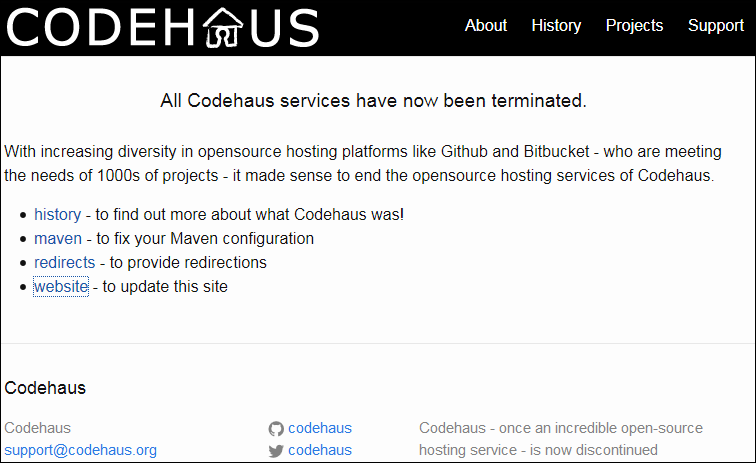
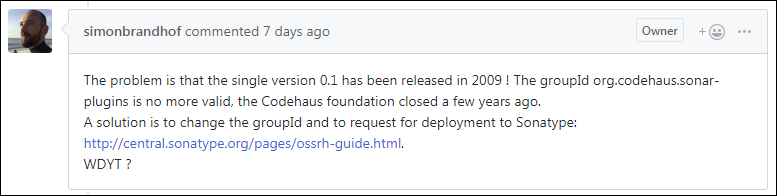
Version 0.1 was hosted at codehaus.org that was terminated around May 17th 2015.
In 
Releases
The code itself is released in the master branch as maven-report-x.y.z. The changes are then merged to the ossrh-releases branch and released as sonarqube-maven-report-x.y.z under the groupId nl.demon.shadowland.maven.plugins, which was already configured for OSSRH access.
The gory details
The OSSRH release and deployment stuff is activated with the openSource profile:
<profile>
<id>openSource</id>
<distributionManagement>
<repository>
<id>ossrh</id>
<name>Open Source Releases</name>
<url>${ossrhHost}/content/repositories/releases</url>
</repository>
<snapshotRepository>
<id>ossrh</id>
<name>Open Source Snapshots</name>
<url>${ossrhHost}/content/repositories/snapshots</url>
</snapshotRepository>
</distributionManagement>
<properties>
<tagNameFormat>@{project.artifactId}-@{project.version}</tagNameFormat>
</properties>
<build>
<plugins>
<plugin>
<groupId>org.apache.maven.plugins</groupId>
<artifactId>maven-gpg-plugin</artifactId>
<executions>
<execution>
<id>sign-artifacts</id>
<phase>verify</phase>
<goals>
<goal>sign</goal>
</goals>
<configuration>
<keyname>${gpg.keyname}</keyname>
<passphraseServerId>${gpg.keyname}</passphraseServerId>
<gpgArguments>
<arg>--pinentry-mode</arg>
<arg>loopback</arg>
</gpgArguments>
</configuration>
</execution>
</executions>
</plugin>
<plugin>
<groupId>org.sonatype.plugins</groupId>
<artifactId>nexus-staging-maven-plugin</artifactId>
</plugin>
</plugins>
</build>
</profile>
For OSSRH deployment the artifacts must be signed with a PGP Signature, which is stored in the settings.xml and referenced by gpg.keyname:
<servers>
<server>
<id>DD605CC8A9582C0D</id>
<passphrase>{…}</passphrase>
</server>
</servers>
…
<profiles>
<profile>
<id>gnupg</id>
<activation>
<activeByDefault>true</activeByDefault>
</activation>
<properties>
<gpg.executable>…/gpg</gpg.executable>
<gpg.keyname>DD605CC8A9582C0D</gpg.keyname>
<gpg.skip>false</gpg.skip>
</properties>
</profile>
</profiles>
The OSSRH account is also stored in the settings.xml and is referenced by the id from the distributionManagement:
<servers>
<server>
<id>ossrh</id>
<username>username</username>
<password>{…}</password>
</server>
</servers>
In case of Java code the Sources and the Javadoc must also be included:
<profiles>
<profile>
<id>documents</id>
<build>
<plugins>
<plugin>
<groupId>org.apache.maven.plugins</groupId>
<artifactId>maven-source-plugin</artifactId>
</plugin>
<plugin>
<groupId>org.apache.maven.plugins</groupId>
<artifactId>maven-javadoc-plugin</artifactId>
</plugin>
</plugins>
</build>
</profile>
</profiles>
Note: When sources and javadoc are generated in the same phase verify as the PGP Signing make sure the documents profile is placed before the openSource profile, otherwise they won't get signed and thus the deployment will fail.
Usage version 0.2.x


Add the plugin to the reporting section in the POM:
<project>
…
<reporting>
<plugins>
<plugin>
    <groupId>nl.demon.shadowland.maven.plugins</groupId>
    <artifactId>sonarqube-maven-report</artifactId>
    <version>0.2.2</version>
</plugin>
</plugins>
</reporting>
</project>
Usage version 0.1


Add the plugin to the reporting section in the POM:
<project>
  …

  <reporting>
    <plugins>
      <plugin>
        <groupId>org.codehaus.sonar-plugins</groupId>
        <artifactId>maven-report</artifactId>
        <version>0.1</version>
      </plugin>
    </plugins>
  </reporting>
</project>
Usage properties
Optionally, you can add the following properties to override default values:
<project>
  …

  <properties>
    <!-- default value is http://localhost:9000 -->
    <sonar.host.url>https://sonarcloud.io/</sonar.host.url>
    <!-- no branch by default -->
    <branch>osssrh-releases</branch>
  </properties>

  …

  <reporting>
    …
  </reporting>
</project>
Note: The Maven report uses as default SonarQube for title, header and html filename. But in case of host sonarcloude.io the report switches to SonarCloud.
To see the Maven report in action this project is mirrored on GitLab, where the branch ossrh-releases is used to generate the site with a .gitlab-ci.yml.
Usage Maven
Generate the Maven site with: mvn site.
Generate only the report with mvn nl.demon.shadowland.maven.plugins:sonarqube-maven-report:0.2.2:report [-Dsonar.host.url=https://sonarcloud.io/].
Note: To make sure both commands result in the same content, take a look under the hood of Maven to understand the alternative pluginManagement usage shown below.
Maven under the hood
First consider the way the SonarReportMojo defined the url parameter:
  @Parameter( property = "sonar.host.url", defaultValue = "http://localhost:9000", alias = "sonar.host.url", required = true )
  private String sonarHostURL;
Thus there are 3 ways to set this parameter in the POM, which are of course all overruled by the command line option -Dsonar.host.url:
<?xml version="1.0" encoding="UTF-8"?>

<project xmlns="http://maven.apache.org/POM/4.0.0" xmlns:xsi="http://www.w3.org/2001/XMLSchema-instance" xsi:schemaLocation="http://maven.apache.org/POM/4.0.0 https://maven.apache.org/xsd/maven-4.0.0.xsd">
  <modelVersion>4.0.0</modelVersion>

  <properties>
    <sonar.host.url>https://sonar.property.com/</sonar.host.url>
  </properties>

  <build>
    <pluginManagement>
      <plugins>
        <plugin>
          <groupId>nl.demon.shadowland.maven.plugins</groupId>
          <artifactId>sonarqube-maven-report</artifactId>
          <version>0.2.2</version>
          <configuration>
            <sonarHostURL>https://sonar.plugin.management.com/</sonarHostURL>
          </configuration>
        </plugin>
      </plugins>
    </pluginManagement>
  </build>

  <reporting>
      <plugin>
        <groupId>nl.demon.shadowland.maven.plugins</groupId>
        <artifactId>sonarqube-maven-report</artifactId>
        <version>0.2.2</version>
        <configuration>
          <sonarHostURL>https://sonar.reporting.com/</sonarHostURL>
        </configuration>
      </plugin>
    </plugins>
  </reporting>
</project>
Testing these three possibilities with the above mentioned two Maven Usage commands will not result in the same content for the last reporting configuration.
Usage alternative pluginManagement
Alternatively, you can add the following plugin management to override default values:
<?xml version="1.0" encoding="UTF-8"?>

<project xmlns="http://maven.apache.org/POM/4.0.0" xmlns:xsi="http://www.w3.org/2001/XMLSchema-instance" xsi:schemaLocation="http://maven.apache.org/POM/4.0.0 https://maven.apache.org/xsd/maven-4.0.0.xsd">
  <modelVersion>4.0.0</modelVersion>

  <build>
    <pluginManagement>
      <plugins>
        <plugin>
          <groupId>nl.demon.shadowland.maven.plugins</groupId>
          <artifactId>sonarqube-maven-report</artifactId>
          <version>0.2.2</version>
          <configuration>
            <!-- default value is http://localhost:9000 -->
            <sonarHostURL>https://sonarcloud.io/</sonarHostURL>
            <!-- no branch by default -->
            <branch>osssrh-releases</branch>
          </configuration>
        </plugin>
      </plugins>
    </pluginManagement>
  </build>

  <reporting>
      <plugin>
        <groupId>nl.demon.shadowland.maven.plugins</groupId>
        <artifactId>sonarqube-maven-report</artifactId>
        <version>0.2.2</version>
      </plugin>
    </plugins>
  </reporting>
</project>