 JarCasting
What's this
This is a Java Servlet implementation of Plack::Middleware::StaticShared, except the Google Closure compiling feature on javascript files concatination. In addition, Plack::Middleware::StaticShared uses memcached for results caching on the other hand this uses a simple file as cache. So it is strongly recommended to be used with reverse proxy which can cache response of this servelet.
How To Use
Add dependency your project
If you use maven, add the following dependency to your pom.xml.
    <dependency>
        <groupId>com.isenshi</groupId>
        <artifactId>staticshared</artifactId>
        <version>1.0</version>
    </dependency>
Or for gradle user, write your build.gradle just like this.
repositories { mavenCentral() }

dependencies { compile 'com.isenshi:staticshared:1.0' }
Update web.xml
	<servlet>
		<servlet-name>staticshared</servlet-name>
		<servlet-class>com.isenshi.staticshared.SharedServlet</servlet-class>
		<init-param>
			<param-name>base</param-name>
			<param-value></param-value>
		</init-param>
		<init-param>
			<param-name>js</param-name>
			<param-value>text/javascript; charset=utf8</param-value>
		</init-param>
		<init-param>
			<param-name>css</param-name>
			<param-value>text/css; charset=utf8</param-value>
		</init-param>
		<init-param>
			<param-name>nocache</param-name>
			<param-value>true</param-value>
		</init-param>
	</servlet>

	<servlet-mapping>
		<servlet-name>staticshared</servlet-name>
		<url-pattern>/.shared.js/*</url-pattern>
		<url-pattern>/.shared.css/*</url-pattern>
	</servlet-mapping>
You can configure "base" parameter as a relative path from web application context or as a absolute path on the local filesystem.
Load scripts/css through SharedServlet on your HTML
If you want to load these 3 javascript files ( relative to context path ) with version "v1",
- js/jquery.js
- js/underscore.js
- js/bootstrap.js
then you add a script tag into your jsp file just like this.
<script src="${pageContext.request.contextPath}/.shared.js/v1:js/jquery.js,js/underscore.js,js/bootstrap.js"></script>
Working with Amazon CloudFront dynamic content delivery
Amazon CloudFront is Contents Delivery Network and supports dynamic content delivery. With this dynamic content delivery support, you can distribute static resources concatinated by this Servlet through your CloudFront endpoint. Roughly saying, you can use CloudFront as a cache of this Servlet.
You need create CloudFront distribution first and then add custom origin (named 'staticshared' example below) on this servlet running. To make available dynamic content delivery, create cache behavior setting just like this.
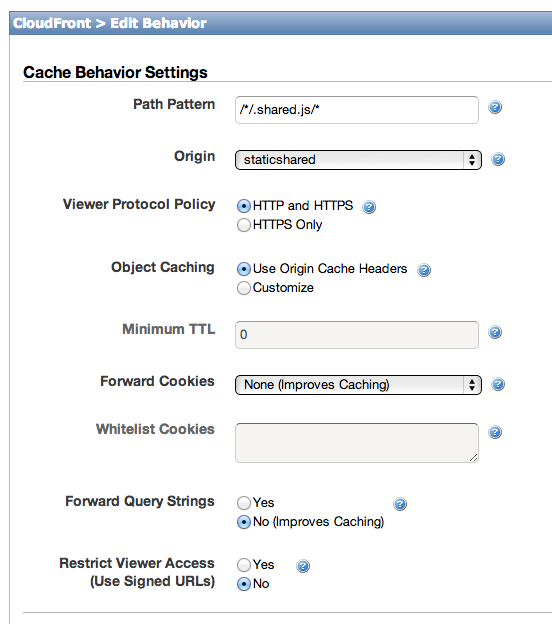
For more details, please check here.
Sample
You can easily know how this works by following steps.
git clone https://github.com/tksmd/static-shared
cd static-shared
./gradlew -info tomcatRun
and then access to the URL ( http://localhost:8080/example ) on your browser.