 JarCasting
JSplitButton
A split button control for Java Swing.



A simple implementation of the split button control for Java Swing. This control raises two events:
buttonClicked(ActionEvent e)splitButtonClicked(ActionEvent e)
The buttonClicked event is raised when the main, or left, part of the button is clicked, which will not trigger the popup menu. The splitButtonClicked event is raised when the split, or right, part of the button is clicked and displays a popup menu.
To handle these events you need a listener that implements:
SplitButtonActionListenerto handle both events in a single listenerButtonClickedActionListenerto handle just buttonClickedSplitButtonClickedActionListenerto handle just splitButtonClicked
See also http://naveedmurtuza.blogspot.ch/2010/11/jsplitbutton.html
Screenshots
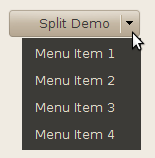
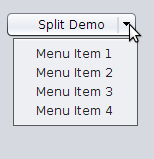
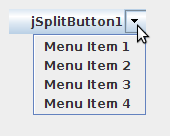
Using the Control
//first instantiate the control
JSplitButton splitButton = new JSplitButton();
//register for listener
splitButton.addSplitButtonActionListener(new SplitButtonActionListener() {

    public void buttonClicked(ActionEvent e) {
        System.out.println("Button Clicked");
    }

    public void splitButtonClicked(ActionEvent e) {
        System.out.println("Split Part Clicked");
    }
});
//add popup menu
splitButton.add(popupMenu);
//add this control to panel
panel.add(splitButton);
or (using Java 8 lambda expressions):
//first instantiate the control
JSplitButton splitButton = new JSplitButton();
//register for button listener
splitButton.addButtonClickedActionListener((ActionEvent e) -> {
    System.out.println("Button Clicked");
});
//register for split button listener
splitButton.addSplitButtonClickedActionListener((ActionEvent e) -> {
    System.out.println("Split Part Clicked");
});
//add popup menu
splitButton.add(popupMenu);
//add this control to panel
panel.add(splitButton);
Prior History
- Original development by Naveed Quadri in 2012
- Updated by Andreas Kuhtz in 2015